

I broke it with Canva. I fixed it with Gemini, GitHub, and Vercel
A high level 'how-to' after about 15 years!

When I started this blog in about 2011, I wrote quite a few how-to posts. How to use Google Calendar for lesson planning. How to write Google Scripts to auto-generate formative assessment spreadsheets for student progress. That kind of thing. I liked writing them, and I think people found them useful as there wasn’t that much information out there on how to apply new tech tools to education
I do less of that now. Partly because YouTube can show you how to do almost anything in three minutes (like how to ‘How to avoid getting caught cheating with AI’, and partly because a conversation with generative AI will often get you to the same place faster than a tutorial ever could. The how-to post feels a little redundant when your AI assistant can walk you through the exact steps in real time.
That said, I did promise in my last post that I would share how I actually built the Inclusive AI Assessment Checker. So this is that post. Not quite a step-by-step tutorial, but a honest account of what worked, what spectacularly didn’t, and what I’d do differently if I were starting from scratch (which, it turns out, I was).

The first version and why it broke
The original tool was built in Canva AI and published on Vercel. It looked fine. It worked, for a while. But I had made a fairly embarrassing rookie mistake: I had hard-coded the API key directly into the front-end code.
Here’s why that matters. When you build something like this, you need an API key to connect the tool to the AI model powering it. That key is essentially a password. If you embed it in code that is publicly visible (and front-end code is always publicly visible to anyone who knows where to look), you have essentially left your front door unlocked with a note on it saying “key under the mat.” The key can be found, misused, and before long you are getting billed for API calls you did not make. The tool broke. Back to square one.
Two dead ends before the right path
My first instinct was to rebuild using either ChatGPT with its coding features - Codex (outstanding Radiohead song BTW), or Claude Code. Both are genuinely impressive tools and I have used both for other things. But in this case, they both sent me down the same rabbit hole: increasingly complicated instructions, suggestions I didn’t fully understand, more layers of configuration, more things to install. I kept waiting to emerge on the other side with a working tool. Instead I just kept getting deeper in.
That is not a criticism of those tools. I think the problem was that I was trying to retrofit security into a design that wasn’t built for it from the start.
Starting fresh with Gemini
What actually worked was starting from scratch with a semi-clear prompt in Gemini. I described what I wanted to build, why, included some links and screen shots of the original, and what constraints I had. It wasn’t very planned, and I didn’t use any form of the redundant prompting frameworks that we’ve been told that we need to use each time we talk to our AI pals - I think it was almost a bit of a rambling voice to text interaction like the one below.
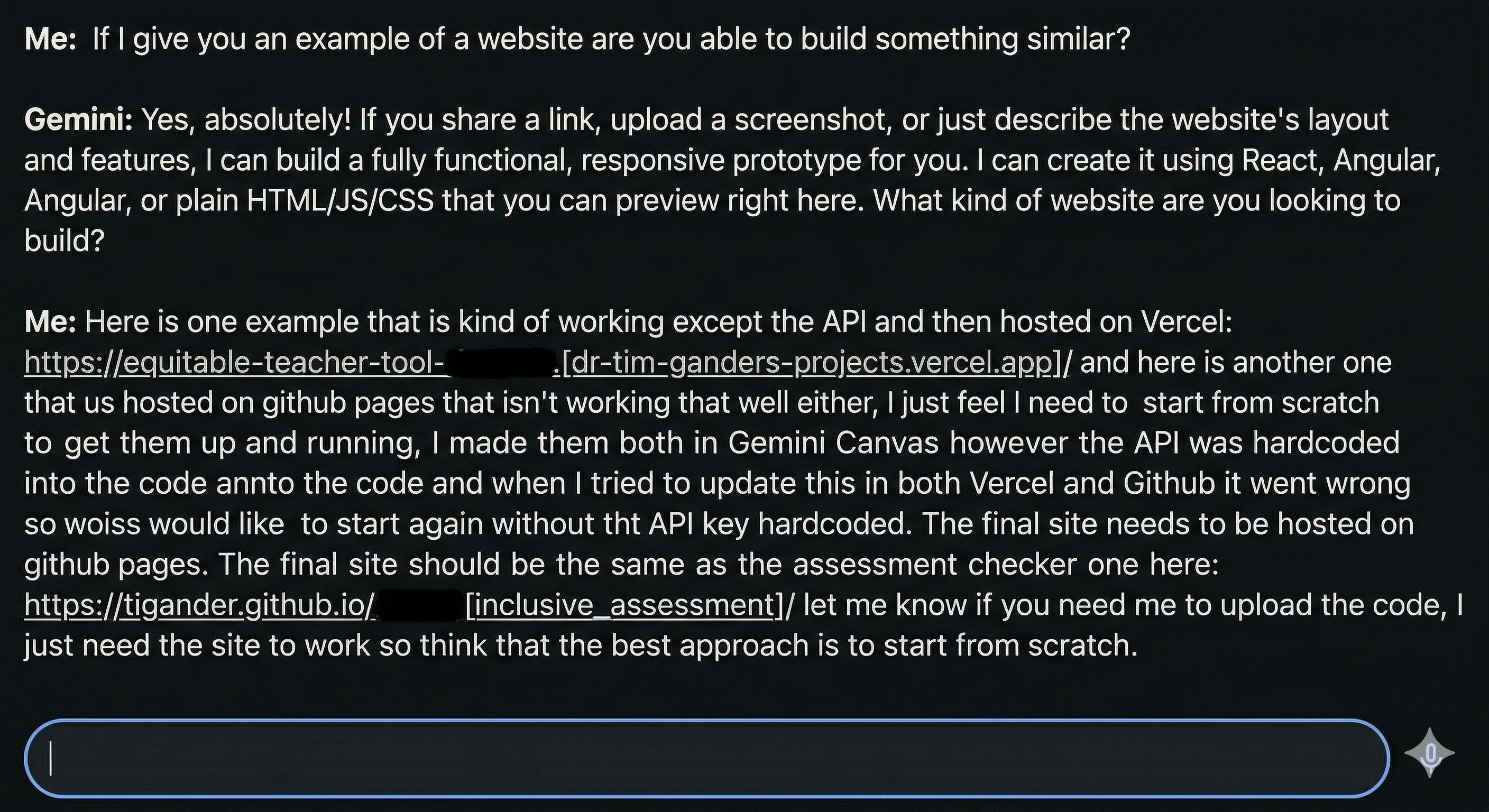
One thing worth mentioning here: I was using Gemini Canvas, which gives you a split view of the conversation and a live preview of the tool as it takes shape. This is genuinely useful if, like me, you are not reading the code line by line. You can see what you are building in real time, catch obvious problems early, and direct Gemini to fix them without having to deploy anything first. It removes a lot of the guesswork and makes the most of the dialogic capabilities we are now used to with generativeAI.
I was pleasantly surprised as Gemini generated working code from that rough starting point. The key difference was that because I had been clear about the server-side requirement from the beginning, the code was structured correctly from the start. The API key would live in Vercel’s environment variables, not in the public code.
Getting it live: GitHub and Vercel
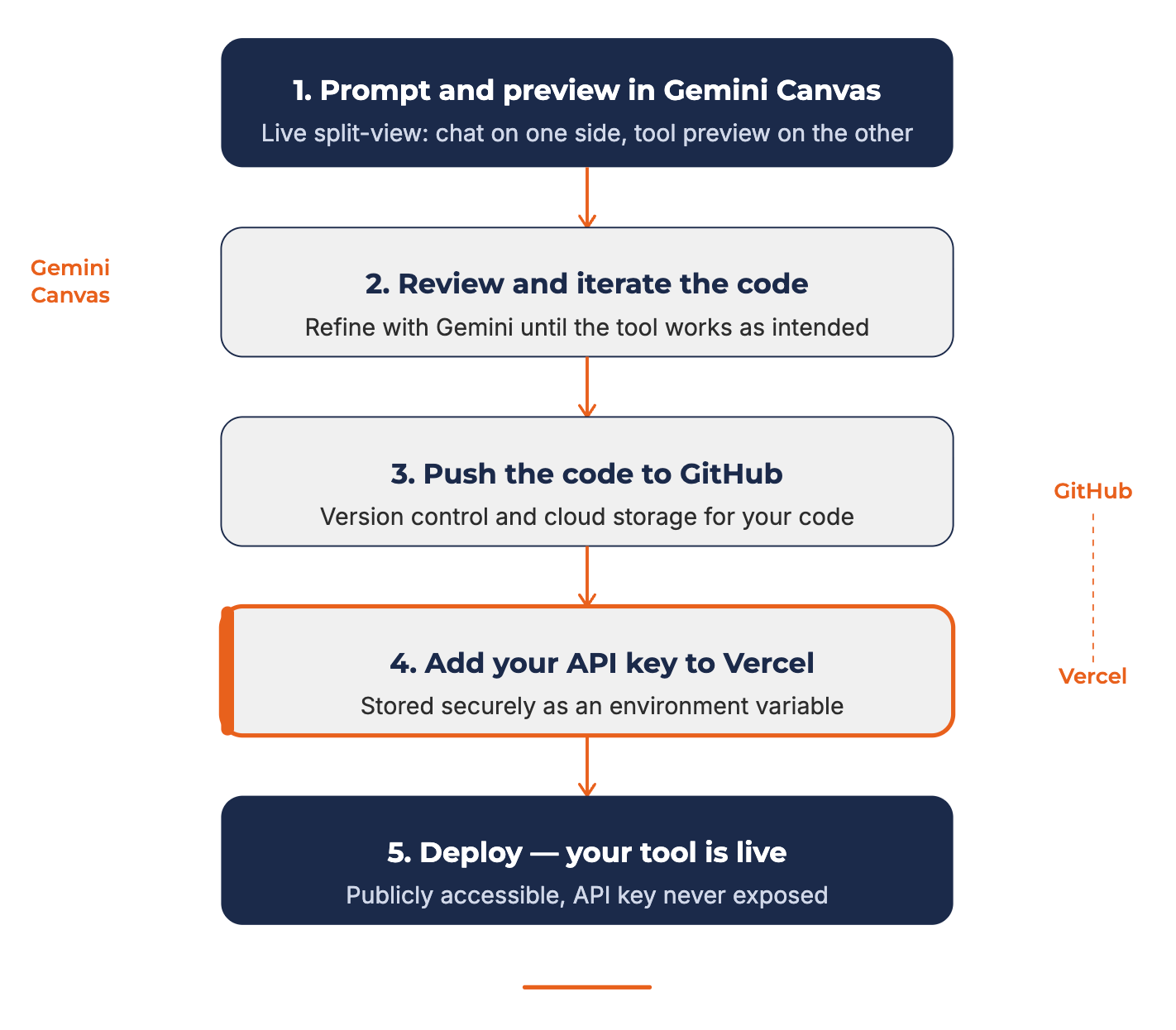
Once the code was working, the deployment process was actually straightforward. The broad steps were:
First, I got a Google Gemini API key from Google Cloud Console. This is free to set up, and Google AI Studio makes it reasonably painless.
Then I pushed the code to GitHub. GitHub is a platform for storing and managing code, and it doubles as the bridge between writing your code and publishing it. If that sounds technical, think of it as a very structured Google Drive, but for code. Bee did a tool intro to GitHub for hosting pages in the same week where I shared the original tool for Inclusive Assessment.
From there, I connected the GitHub repository to Vercel. Vercel is a hosting platform that specialises in deploying web applications, and when you push code, it makes it available across the globe almost immediately. The key moment was adding the API key to Vercel’s environment variables, which means it is stored securely on the server and never visible in the code itself. That is what I should have done the first time. I don’t need to go into detail about the steps to take to get this live, as you really just need to ask Gemini how to add your API to Vercel etc.
Why this matters beyond the tool
You can probably tell that I am not a coder, or software developer (however I did teach myself X-Code and Objective-C to make some very basic iPhone apps over 10 years ago). I do not write code as a profession. What I have done here is use AI tools to build things that would have taken significant technical expertise to produce just a few years ago.
And that is the interesting part. You could follow this same process to build tools for your own school or service. I have used variations of it to build a tool that generates multiple perspectives on a lesson plan, and another that helps schools draft an AI policy grounded in their own values and learner voice. None of these required me to know how to code. They required me to know what I wanted to build, and to be vaguely specific enough in my prompting to get there.
The workflow is roughly this: start with a clear(ish) prompt in Gemini Canvas that describes what you want and any important constraints (including security ones), get working code, push it to GitHub, and deploy it on Vercel with your API key stored securely in ‘secret’ environment variables.
Is there a learning curve? Yes. Will you hit moments of confusion? Also yes. But the gap between “I have an idea for a tool” and “I have a tool” has narrowed considerably.
If you build something using this approach, I would genuinely love to hear about it. Share it in the EPIT AiEdCoP community or reply to this post. These tools are most useful when we share them, adapt them, and build on each other’s work.